RFID and Face ID authentication using ESP32 CAM
In this project we are going to use the ESP32 CAM and RFID rc522 Module to authenticate a user by their RFID tag and Face. This project involves using a python web server that takes in the base64 image data from esp32 cam and identifies the user using open cv face recognition.
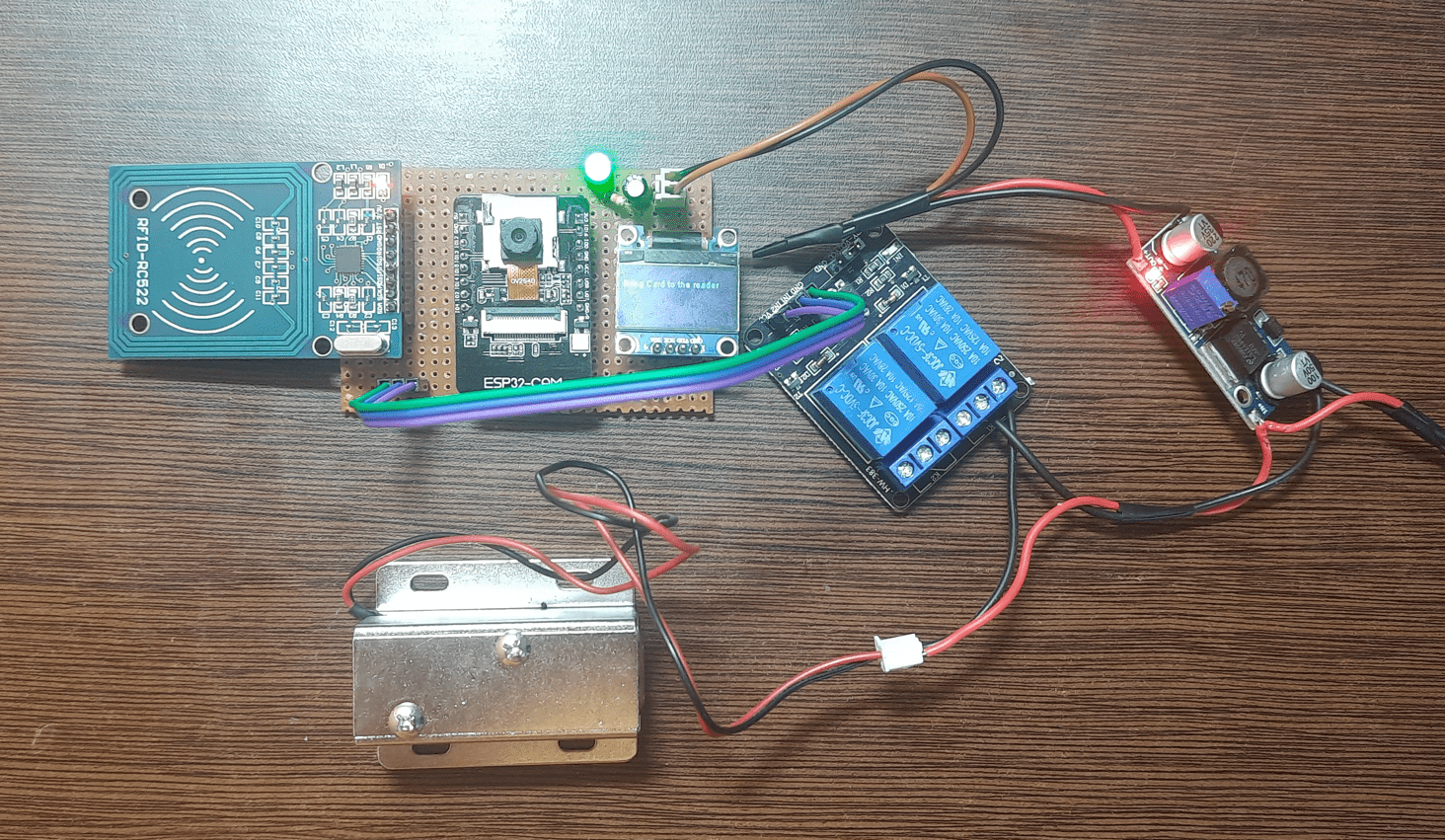
Project Overview
Dual-Factor Authentication System Using ESP32-CAM and RFID RC522
Project Description
This project implements a dual-factor authentication system leveraging the ESP32-CAM and RFID RC522 module. The solution provides enhanced security by requiring both RFID-based and facial recognition-based verification before granting access, combining IoT hardware with computer vision techniques.
System Operation
The authentication process follows a sequential verification workflow:
RFID Verification
The RFID RC522 module reads the user’s RFID tag to validate credential ownership.
Facial Recognition
The ESP32-CAM captures an image of the user.
The image is encoded in Base64 format and transmitted to a Python-based web server.
The server processes the image using OpenCV face recognition to verify the user’s identity.
Access Decision
Access is granted only when both verification steps succeed:
The RFID tag matches a registered user.
The facial recognition system confirms the user’s identity.
Hardware Components
ESP32-CAM Board
RFID RC522 Module
OLED Display (for status feedback)
LED (for visual indication)
10kΩ Resistor
10µF Capacitor
Software and Development Tools
Microcontroller Firmware: Arduino IDE for ESP32-CAM programming
Server-Side Application: Python-based web server with OpenCV library for face recognition
Communication Protocol: HTTP with Base64-encoded image transmission
Project Objective
To develop a cost-effective, reliable authentication system suitable for applications such as smart door access control, attendance tracking, and IoT-based security solutions.
Key Features
Dual-factor authentication combining RFID and facial recognition
Wireless image transmission from ESP32-CAM to a central server
Server-side face processing using OpenCV
Real-time access control decision-making
Visual feedback via OLED display and LED indicators
Potential Applications
Secure entry systems for residential or commercial use
Automated attendance and access logging
IoT-enabled security and monitoring solutions
This project demonstrates the integration of embedded systems, wireless communication, and computer vision to create a multi-layered authentication framework suitable for enhanced security applications.
Gallery
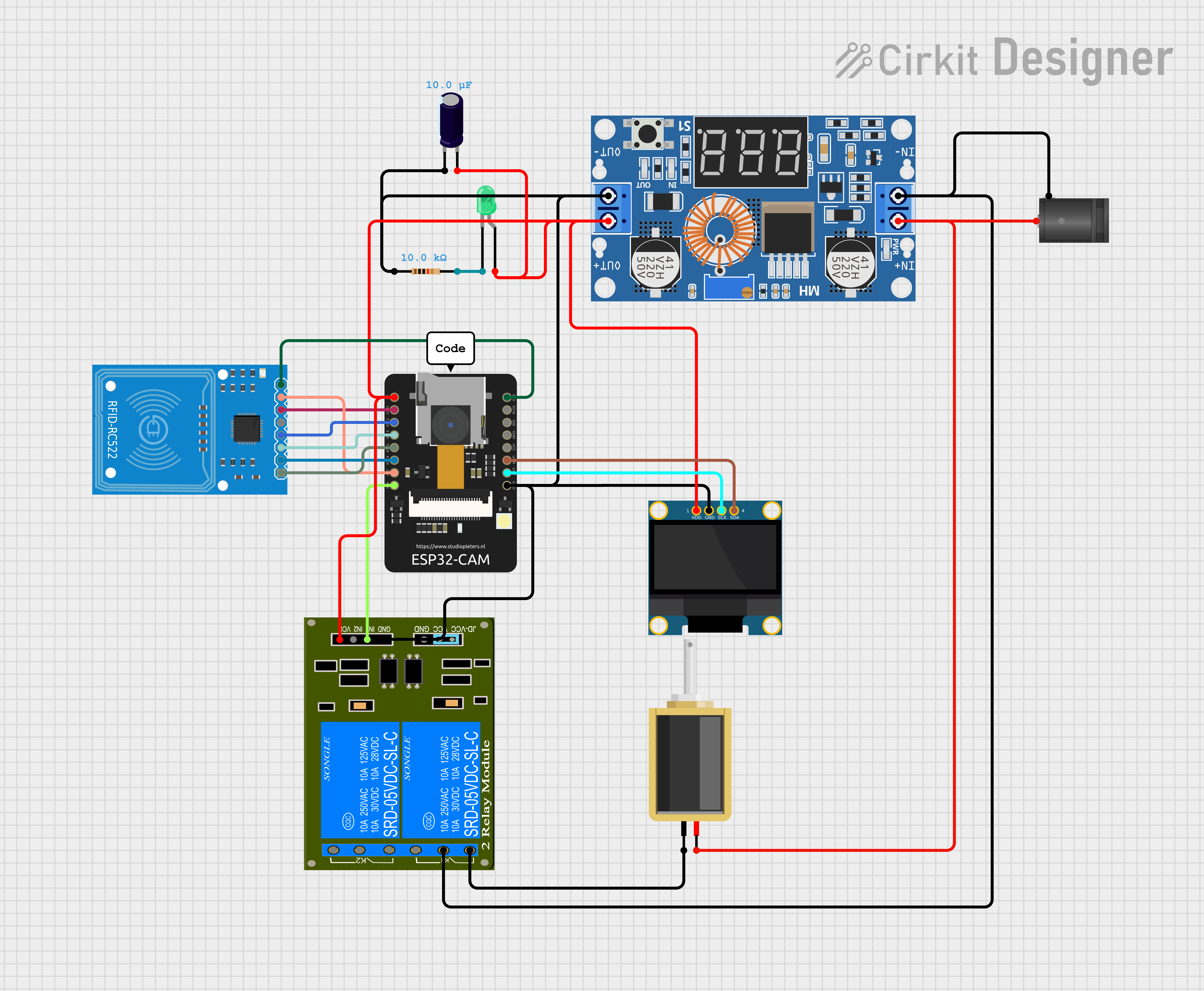
circuit diagram
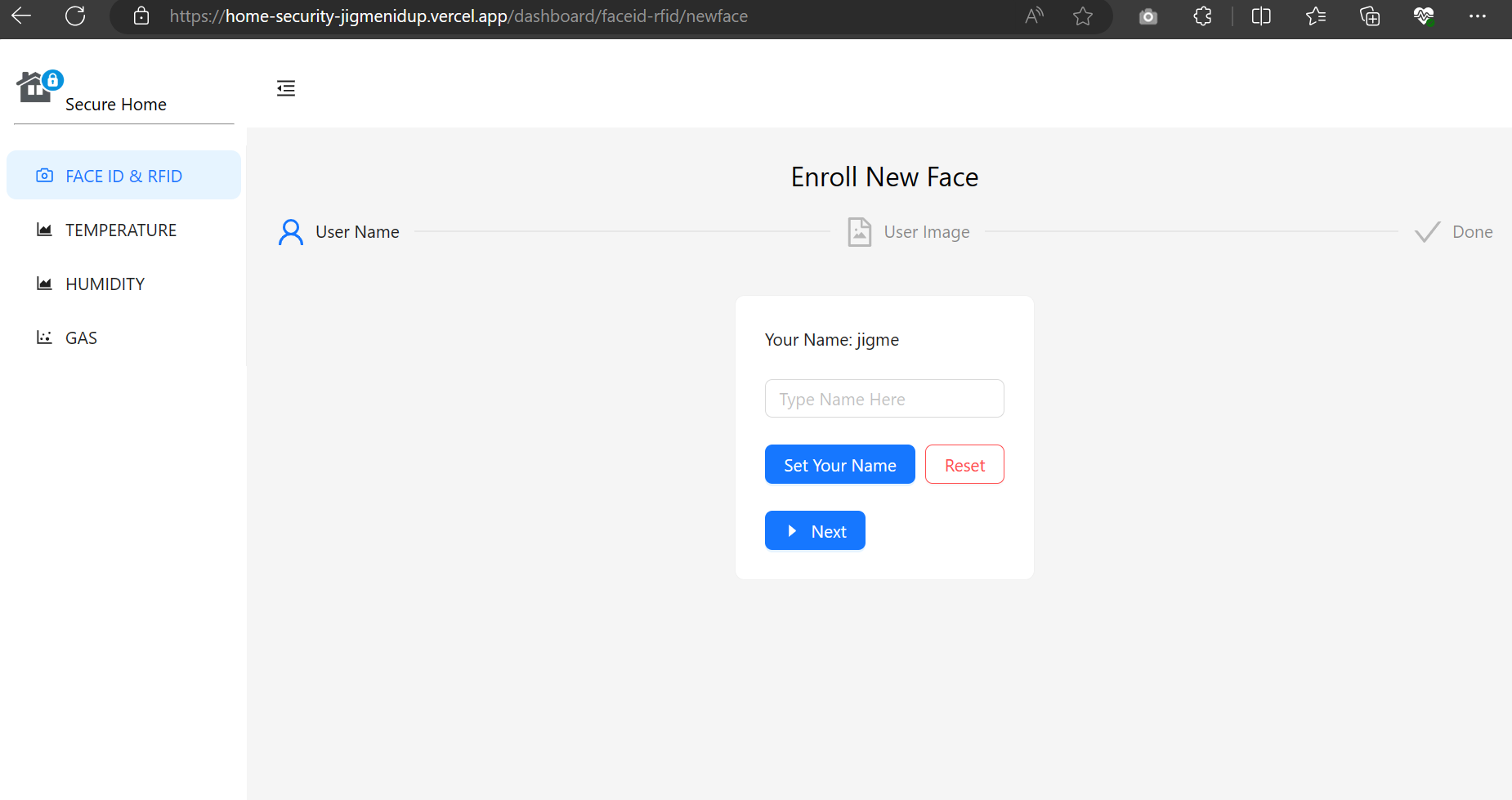
enroll new face
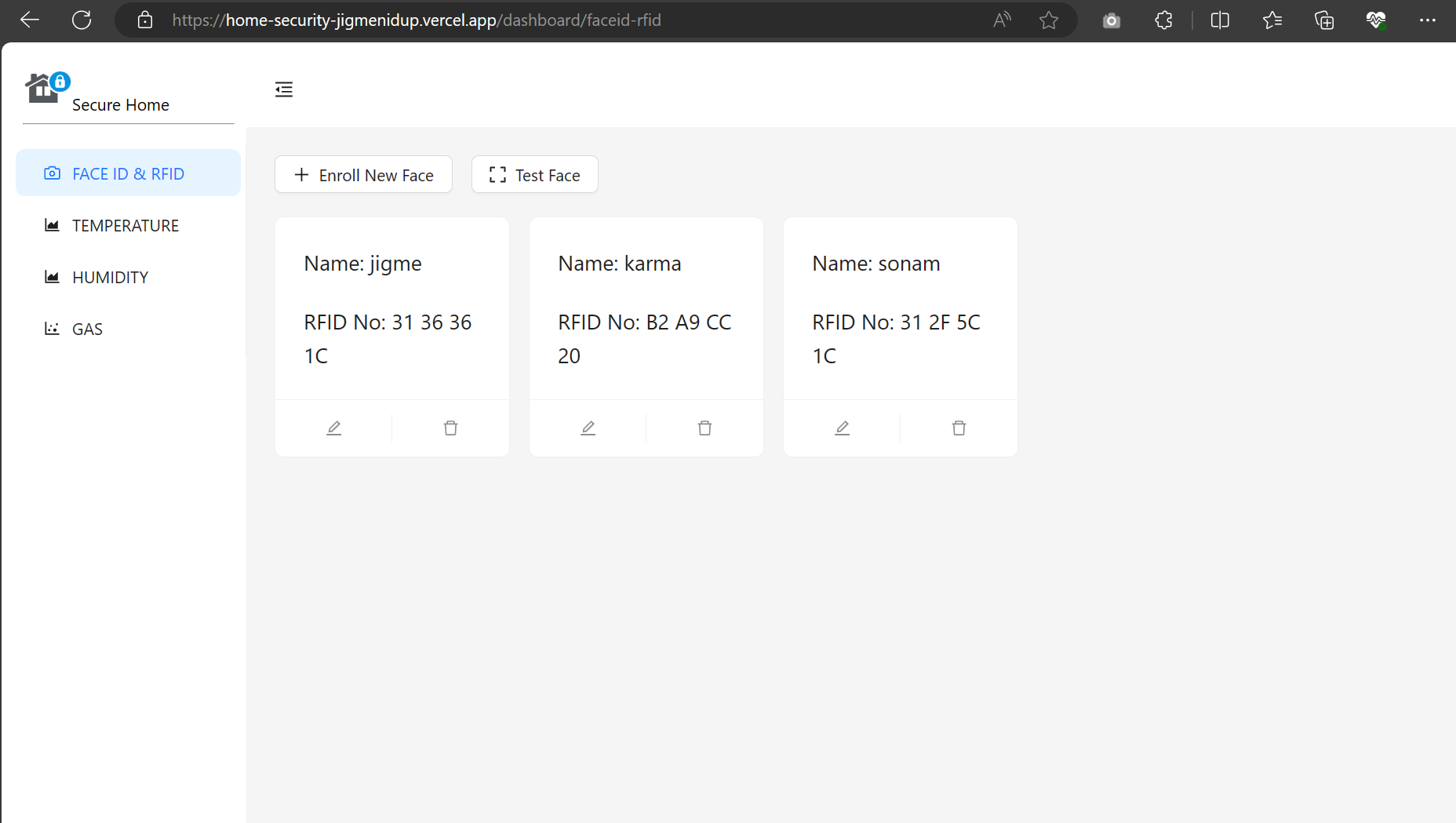
rfid and user list
Code Examples
1//wifi and http
2// #include <WiFi.h>
3#include <WiFiClientSecure.h>
4#include <WiFiManager.h>
5#include <base64.h>
6#include <HTTPClient.h>
7#include <Arduino_JSON.h>
8
9//CAMERA
10#include "esp_camera.h"
11#include "Arduino.h"
12#include "soc/soc.h"           // Disable brownour problems
13#include "soc/rtc_cntl_reg.h"  // Disable brownour problems
14#include "driver/rtc_io.h"
15
16// Pin definition for CAMERA_MODEL_AI_THINKER
17#define PWDN_GPIO_NUM 32
18#define RESET_GPIO_NUM -1
19#define XCLK_GPIO_NUM 0
20#define SIOD_GPIO_NUM 26
21#define SIOC_GPIO_NUM 27
22
23#define Y9_GPIO_NUM 35
24#define Y8_GPIO_NUM 34
25#define Y7_GPIO_NUM 39
26#define Y6_GPIO_NUM 36
27#define Y5_GPIO_NUM 21
28#define Y4_GPIO_NUM 19
29#define Y3_GPIO_NUM 18
30#define Y2_GPIO_NUM 5
31#define VSYNC_GPIO_NUM 25
32#define HREF_GPIO_NUM 23
33#define PCLK_GPIO_NUM 22
34
35//RFID
36#include <MFRC522.h>  //library responsible for communicating with the module RFID-RC522
37#include <SPI.h>      //library responsible for communicating of SPI bus
38
39//OLED
40#include <Wire.h>
41#include "SSD1306.h"
42
43#define SS_PIN 15
44#define RST_PIN 2
45MFRC522 mfrc522(SS_PIN, RST_PIN);  // Create MFRC522 instance.
46
47//set spi pins for RFID
48#define SCK1 14
49#define MISO1 12
50#define MOSI1 13
51#define SS1 15
52
53//set i2c pins for OLED
54#define I2C_SDA 1
55#define I2C_SCL 3
56SSD1306 display(0x3c, I2C_SDA, I2C_SCL);
57// ===========================
58// Enter your WiFi credentials
59// ===========================
60const char* ssid = "bruh";
61const char* password = "megabruh";
62
63// ===========================
64// Enter your server information
65// ===========================
66//https://home-security-jigmenidup.vercel.app/api/upload  cloud
67
68//http://192.168.50.92:3000/api/rfid  local
69// const char* serverName = "http://192.168.50.92:3000/api/rfid";
70const char* serverRFID = "https://home-security-jigmenidup.vercel.app/api/rfid";
71
72const char* serverUpload = "https://home-security-jigmenidup.vercel.app/api/upload";
73
74int relay_pin = 4;
75
76//relay state
77bool allowAccess = false;
78
79//wifi manager AP name
80const char* ssid_AP = "ESP32HomeSecurityAP";
81//wifi connected state
82bool isOnline = false;
83
84//rfid valid list
85int num_users = 1;
86const int max_num_users = 5;
87String validlist[max_num_users] = { "B4 43 B6 07" };
88String validName[max_num_users] = { "SYS admin" };
89
90void getUID() {
91  String responseBody;
92  display.clear();
93  display.drawString(0, 0, "Connecting to server");
94  display.display();
95
96  if (WiFi.status() == WL_CONNECTED) {
97    // WiFiClient client;
98    WiFiClientSecure client;
99    client.setInsecure();
100
101    HTTPClient http;
102
103    http.begin(client, serverRFID);
104    display.drawString(0, 10, "Connection successful!");
105    display.drawString(0, 20, "Fetch RFID...");
106    display.display();
107
108    int httpResponseCode = http.GET();
109    if (httpResponseCode == 200) {
110      String payload = "{}";
111      payload = http.getString();
112      JSONVar myObject = JSON.parse(payload);
113
114      JSONVar keys = myObject.keys();
115
116      for (int i = 0; i < keys.length(); i++) {
117        //limit num of users
118        if (i + 1 > max_num_users) {
119          break;
120        }
121
122        JSONVar value = myObject[keys[i]];
123        String rfid_val = JSON.stringify(value);
124        rfid_val.remove(12, 1);
125        rfid_val.remove(0, 1);
126
127        validlist[i + 1] = rfid_val;
128
129        String rfid_user = JSON.stringify(keys[i]);
130        validName[i + 1] = rfid_user;
131        num_users += 1;  //increase num of users
132        display.clear();
133        display.drawString(10, 10, rfid_val);
134        display.drawString(10, 20, rfid_user);
135        display.display();
136        delay(3000);
137      }
138
139      display.drawString(0, 30, "Fetched RFID details...");
140      display.display();
141      delay(2000);
142
143    } else {
144      display.drawString(0, 40, "Response: " + String(httpResponseCode));
145      display.display();
146    }
147    http.end();
148
149  } else {
150    responseBody = "Connection to server failed.";
151    display.drawString(0, 10, "Response: " + String(responseBody));
152    display.display();
153    isOnline = false;
154    delay(2000);
155  }
156}
157
158void setup_camera() {
159  camera_config_t config;
160  config.ledc_channel = LEDC_CHANNEL_0;
161  config.ledc_timer = LEDC_TIMER_0;
162  config.pin_d0 = Y2_GPIO_NUM;
163  config.pin_d1 = Y3_GPIO_NUM;
164  config.pin_d2 = Y4_GPIO_NUM;
165  config.pin_d3 = Y5_GPIO_NUM;
166  config.pin_d4 = Y6_GPIO_NUM;
167  config.pin_d5 = Y7_GPIO_NUM;
168  config.pin_d6 = Y8_GPIO_NUM;
169  config.pin_d7 = Y9_GPIO_NUM;
170  config.pin_xclk = XCLK_GPIO_NUM;
171  config.pin_pclk = PCLK_GPIO_NUM;
172  config.pin_vsync = VSYNC_GPIO_NUM;
173  config.pin_href = HREF_GPIO_NUM;
174  config.pin_sscb_sda = SIOD_GPIO_NUM;
175  config.pin_sscb_scl = SIOC_GPIO_NUM;
176  config.pin_pwdn = PWDN_GPIO_NUM;
177  config.pin_reset = RESET_GPIO_NUM;
178  config.xclk_freq_hz = 20000000;
179  config.pixel_format = PIXFORMAT_JPEG;
180
181  config.frame_size = FRAMESIZE_SVGA;  // FRAMESIZE_ + QVGA|CIF|VGA|SVGA|XGA|SXGA|UXGA
182  config.jpeg_quality = 12;
183  config.fb_count = 1;
184
185  // // Init Camera
186  esp_err_t err = esp_camera_init(&config);
187
188  if (err != ESP_OK) {
189    display.clear();
190    display.drawString(0, 0, "Camera init failed");
191    display.display();
192    delay(3000);
193  } else {
194    display.clear();
195    display.drawString(0, 0, "Camera init");
196    display.display();
197    delay(1000);
198  }
199}
200
201//set wifi credentials
202void OnDemandWifi() {
203
204  display.clear();
205  display.drawString(0, 0, "Welcome to WiFi Manager");
206  display.drawString(0, 10, "1.Connect to WIFI: ");
207  display.drawString(0, 20, ssid_AP);
208  display.drawString(0, 30, "2.Open Your Browser at: ");
209  display.drawString(0, 40, "192.168.4.1");
210  display.drawString(0, 50, "3.Enter WIFI credentials: ");
211  display.display();
212
213  WiFiManager wm;
214
215  //reset settings - for testing
216  // wm.resetSettings();
217
218  int timeout = 120;  // 120 seconds to run for ie 2 min
219  // set configportal timeout
220  // 2 min to connect to given wifi
221  wm.setConfigPortalTimeout(timeout);
222
223  if (!wm.autoConnect(ssid_AP)) {
224    Serial.println("failed to connect and hit timeout");
225    display.clear();
226    display.drawString(0, 0, "Failed to Connect");
227    display.drawString(0, 20, "Offline mode");
228    display.display();
229    delay(3000);
230    isOnline = false;
231    delay(5000);
232  } else {
233    //connected to the WiFi
234    Serial.println("connected to wifi");
235    isOnline = true;
236
237    Serial.println("");
238    Serial.println("WiFi connected");
239    display.clear();
240    display.drawString(0, 0, "WiFi connected");
241    display.display();
242
243    Serial.print("ESP32-CAM IP Address: ");
244    Serial.println(WiFi.localIP());
245    display.drawString(0, 10, "ESP32-CAM IP Address: ");
246    display.drawString(0, 20, String(WiFi.localIP()));
247    display.display();
248    delay(2000);
249
250      //fetch rfid uids from webserver
251    getUID();
252    // setup CAMERA only when online
253    setup_camera();
254
255    delay(2000);
256  }
257}
258
259void setup() {
260  WRITE_PERI_REG(RTC_CNTL_BROWN_OUT_REG, 0);  //disable brownout detector
261
262  //I2C - OLED
263  display.init();
264
265  display.clear();
266  display.drawString(0, 0, "Starting....");
267  display.display();
268  delay(2000);
269
270  //SPI - RFID
271  SPI.begin(SCK1, MISO1, MOSI1, SS1);
272  mfrc522.PCD_Init();  // Initiate MFRC522
273
274  //setup wifi
275  if (!isOnline) {
276    OnDemandWifi();
277  }
278  delay(2000);
279
280  pinMode(relay_pin, OUTPUT);
281  digitalWrite(relay_pin, LOW);
282}
283
284bool ValidateID(String id) {
285
286  bool isvalid = false;
287  for (int i = 0; i < num_users; i++) {
288    if (id == validlist[i]) {
289      display.drawString(0, 30, validName[i]);
290      isvalid = true;
291      break;
292    }
293  }
294  return isvalid;
295}
296
297void takePicture() {
298
299  String responseBody;
300  display.clear();
301
302  camera_fb_t* fb = NULL;
303  fb = esp_camera_fb_get();
304  if (!fb) {
305    display.drawString(0, 0, "Camera capture failed");
306    display.display();
307    delay(3000);
308    // ESP.restart();
309    allowAccess = false;
310  }
311
312  display.drawString(0, 0, "Connecting to server: ");
313  display.display();
314
315  if (WiFi.status() == WL_CONNECTED) {
316    // WiFiClient client;
317    WiFiClientSecure client;
318    client.setInsecure();
319
320    HTTPClient http;
321
322    http.begin(client, serverUpload);
323    display.drawString(0, 10, "Connection successful!");
324    display.drawString(0, 20, "Sending Image...");
325    display.display();
326
327    String encoded = base64::encode(fb->buf, fb->len);
328
329    http.addHeader("Content-Type", "application/json");
330    String body = "{\"imgdata\":\"" + encoded + "\"}";
331    int httpResponseCode = http.POST(body);
332
333    display.drawString(0, 30, "Response Code: " + String(httpResponseCode));
334    display.display();
335
336    if (httpResponseCode == 200) {
337      allowAccess = true;
338    } else {
339      allowAccess = false;
340    }
341    esp_camera_fb_return(fb);
342    http.end();
343
344  } else {
345    responseBody = "Connection to server failed.";
346    display.drawString(0, 10, responseBody);
347    display.display();
348    esp_camera_fb_return(fb);
349    allowAccess = false;
350  }
351}
352
353void loop() {
354  delay(100);
355  display.clear();
356  if (isOnline) {
357    display.drawString(0, 0, "Online Mode");
358
359  } else {
360    display.drawString(0, 0, "Offline Mode");
361  }
362  display.drawString(0, 10, "Bring Card to the reader");
363  display.display();
364
365  // Look for new cards
366  if (!mfrc522.PICC_IsNewCardPresent()) {
367    return;
368  }
369  // Select one of the cards
370  if (!mfrc522.PICC_ReadCardSerial()) {
371    return;
372  }
373
374  String content = "";
375  byte letter;
376  for (byte i = 0; i < mfrc522.uid.size; i++) {
377    content.concat(String(mfrc522.uid.uidByte[i] < 0x10 ? " 0" : " "));
378    content.concat(String(mfrc522.uid.uidByte[i], HEX));
379  }
380  content.toUpperCase();
381  display.clear();
382  if (isOnline) {
383    display.drawString(0, 0, "Online Mode");
384
385  } else {
386    display.drawString(0, 0, "Offline Mode");
387  }
388  display.drawString(0, 10, "UID tag: " + content.substring(1));
389  if (ValidateID(content.substring(1))) {
390    display.drawString(0, 20, "Authorized RFID");
391    display.display();
392
393    //take 3 photos and if one is valid then open lock when connected to wifi
394    if (isOnline) {
395      for (int i = 0; i < 3; i++) {
396        if (allowAccess) {
397          break;
398        }
399        takePicture();
400        delay(1500);
401      }
402    } else {
403      allowAccess = true;
404    }
405
406    if (allowAccess) {
407      //Light the LED to indicate success
408      display.drawString(0, 40, "Authorized");
409      display.display();
410      digitalWrite(relay_pin, HIGH);
411      delay(5000);
412    } else {
413      display.drawString(0, 40, "Access Denied");
414      display.display();
415      delay(5000);
416    }
417
418    delay(5000);
419    digitalWrite(relay_pin, LOW);
420  } else {
421
422    display.drawString(0, 40, "Access Denied");
423    display.display();
424
425    digitalWrite(relay_pin, LOW);
426    delay(5000);
427  }
428
429  allowAccess = false;
430}
431