Display Temperature and Humidity on OLED using STM32F103C8T6
Here we are using DHT11 to sense temperature and humidity values from the environment. The data is then displayed on a 128x64 OLED using STM32F103C8T6. We are also using custom icons for weather to be displayed on the OLED.
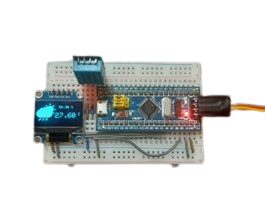
Project Overview
Temperature and Humidity Monitoring System Using STM32F103 and OLED Display
Project Description
This project implements a real-time environmental monitoring system using an STM32 microcontroller, a DHT11 sensor, and an OLED display. The system measures ambient temperature and humidity, presenting the data visually on a 128×64 OLED screen with custom weather icons for enhanced user interpretation.
System Operation
The DHT11 sensor continuously reads temperature and humidity values from the environment.
Data is processed by the STM32F103C8T6 microcontroller.
Processed values are displayed on the OLED screen alongside relevant custom icons, creating an intuitive embedded weather dashboard.
The display updates in real time to reflect current environmental conditions.
Hardware Components
STM32F103C8T6 Development Board
128×64 OLED Display (I²C interface)
DHT11 Temperature and Humidity Sensor
ST-Link V2 Programmer
Software Configuration
Development Environment: Arduino IDE with STM32 core support
I²C Configuration:
SDA pin: PB7
SCL pin: PB6
Display Compatibility Note: For 128×32 OLED displays, adjust the display height parameter to 32 and scale text and icons accordingly.
Project Objective
To design a compact, user-friendly embedded system for real-time weather monitoring, combining STM32-based processing with a clear graphical OLED interface.
Key Features
Real-time environmental data acquisition and visualization
Custom graphical icons for intuitive interpretation of weather conditions
I²C-based OLED interface for efficient display communication
Configurable display support for varying OLED resolutions
This project demonstrates embedded system integration for sensor data acquisition and graphical display, suitable for educational, prototyping, and practical monitoring applications.
Gallery
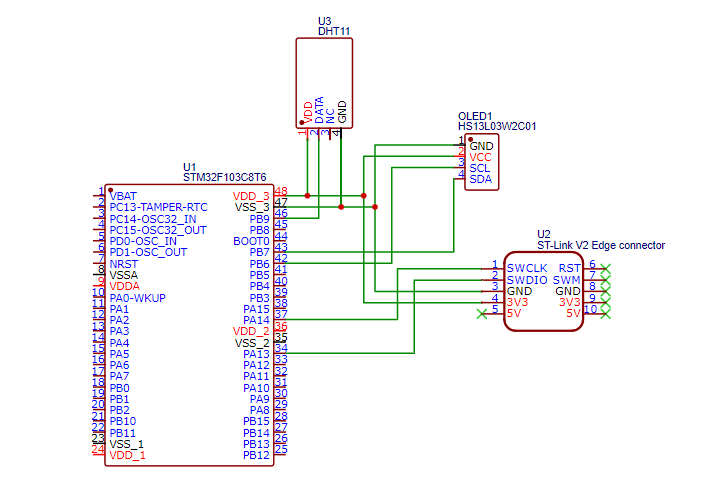
Circuit Diagram
Code Examples
1
2#include <Wire.h>
3#include <Adafruit_GFX.h>
4#include <Adafruit_SSD1306.h>
5
6#define SCREEN_WIDTH 128  // OLED display width,  in pixels
7#define SCREEN_HEIGHT 64  // OLED display height, in pixels
8
9
10#include "DHT.h"
11#define DHT11_PIN PB9
12
13DHT dht11(DHT11_PIN, DHT11);
14
15// declare an SSD1306 display object connected to I2C
16Adafruit_SSD1306 oled(SCREEN_WIDTH, SCREEN_HEIGHT, &Wire, -1);
17
18
19const unsigned char Weather[] PROGMEM = {
20	0x00, 0x00, 0x00, 0x00, 0x00, 0x00, 0x00, 0x00, 0x00, 0x00, 0x00, 0x00, 0x00, 0x00, 0x00, 0x00,
21	0x00, 0x00, 0x00, 0x00, 0x00, 0x00, 0x00, 0x00, 0x00, 0x03, 0x00, 0x00, 0x00, 0x00, 0x00, 0x00,
22	0x07, 0x00, 0x00, 0x00, 0x00, 0x00, 0x00, 0x07, 0x00, 0x00, 0x00, 0x00, 0x00, 0x00, 0x07, 0x00,
23	0x00, 0x00, 0x00, 0x00, 0x00, 0x03, 0x00, 0x00, 0x00, 0x00, 0x00, 0x38, 0x00, 0x00, 0xe0, 0x00,
24	0x00, 0x00, 0x3c, 0x00, 0x00, 0xe0, 0x00, 0x00, 0x00, 0x1e, 0x1f, 0xe1, 0xe0, 0x00, 0x00, 0x00,
25	0x0c, 0x7f, 0xf9, 0xc0, 0x00, 0x00, 0x00, 0x00, 0xff, 0xfc, 0x00, 0x00, 0x00, 0x00, 0x79, 0xff,
26	0xfe, 0x00, 0x00, 0x00, 0x03, 0xff, 0xff, 0xff, 0x00, 0x00, 0x00, 0x0f, 0xff, 0xff, 0xff, 0x00,
27	0x00, 0x07, 0xff, 0xff, 0xff, 0xff, 0x80, 0x00, 0x1f, 0xff, 0xff, 0xff, 0xff, 0x80, 0x00, 0x3f,
28	0xff, 0xff, 0xff, 0xff, 0x80, 0x00, 0x3f, 0xff, 0xff, 0xff, 0xff, 0x9f, 0x00, 0x7f, 0xff, 0xff,
29	0xff, 0xff, 0x9f, 0x01, 0xff, 0xff, 0xff, 0xff, 0xff, 0x8e, 0x03, 0xff, 0xff, 0xff, 0xff, 0xff,
30	0x80, 0x0f, 0xff, 0xff, 0xff, 0xff, 0xff, 0x80, 0x1f, 0xff, 0xff, 0xff, 0xff, 0xff, 0x00, 0x1f,
31	0xff, 0xff, 0xff, 0xff, 0xff, 0x00, 0x3f, 0xff, 0xff, 0xff, 0xff, 0xfe, 0x00, 0x7f, 0xff, 0xff,
32	0xff, 0xff, 0xfc, 0x00, 0x7f, 0xff, 0xff, 0xff, 0xff, 0xf8, 0x80, 0x7f, 0xff, 0xff, 0xff, 0xff,
33	0xfd, 0xc0, 0xff, 0xff, 0xff, 0xff, 0xff, 0xfd, 0xe0, 0xff, 0xff, 0xff, 0xff, 0xff, 0xfc, 0xe0,
34	0xff, 0xff, 0xff, 0xff, 0xff, 0xfc, 0x40, 0xff, 0xff, 0xff, 0xff, 0xff, 0xfc, 0x00, 0xff, 0xff,
35	0xff, 0xff, 0xff, 0xfc, 0x00, 0x7f, 0xff, 0xff, 0xff, 0xff, 0xf8, 0x00, 0x7f, 0xff, 0xff, 0xff,
36	0xff, 0xf8, 0x00, 0x7f, 0xff, 0xff, 0xff, 0xff, 0xf8, 0x00, 0x3f, 0xff, 0xff, 0xff, 0xff, 0xf0,
37	0x00, 0x1f, 0xff, 0xff, 0xff, 0xff, 0xe0, 0x00, 0x0f, 0xff, 0xff, 0xff, 0xff, 0xc0, 0x00, 0x07,
38	0xff, 0xff, 0xff, 0xff, 0x80, 0x00, 0x03, 0xff, 0xff, 0xff, 0xfe, 0x00, 0x00, 0x00, 0x3f, 0xff,
39	0xff, 0xc0, 0x00, 0x00, 0x00, 0x00, 0x00, 0x00, 0x00, 0x00, 0x00, 0x00, 0x00, 0x00, 0x00, 0x00,
40	0x00, 0x00, 0x00, 0x1c, 0x06, 0x03, 0x80, 0x00, 0x00, 0x00, 0x3c, 0x0e, 0x07, 0x80, 0x00, 0x00,
41	0x00, 0x78, 0x1c, 0x0f, 0x00, 0x00, 0x00, 0x00, 0xf0, 0x3c, 0x1e, 0x00, 0x00, 0x00, 0x01, 0xe0,
42	0x78, 0x1c, 0x00, 0x00, 0x00, 0x01, 0xc0, 0x70, 0x38, 0x00, 0x00, 0x00, 0x00, 0x00, 0x00, 0x00,
43	0x00, 0x00, 0x00, 0x00, 0x00, 0x00, 0x00, 0x00, 0x00, 0x00, 0x00, 0x00, 0x00, 0x00, 0x00, 0x00,
44	0x00, 0x00, 0x00, 0x00, 0x00, 0x00, 0x00, 0x00
45};
46
47void setup() {
48  dht11.begin();  // initialize the sensor
49
50  // initialize OLED display with address 0x3C for 128x64
51  if (!oled.begin(SSD1306_SWITCHCAPVCC, 0x3C)) {
52    while (true)
53      ;
54  }
55
56  delay(2000);          // wait for initializing
57  oled.clearDisplay();  // clear display
58
59  oled.setTextSize(1);       // text size
60  oled.setTextColor(WHITE);  // text color
61  oled.display();
62}
63
64void loop() {
65  delay(1000);
66  oled.clearDisplay();
67  // read humidity
68  float humi = dht11.readHumidity();
69  // read temperature as Celsius
70  float tempC = dht11.readTemperature();
71  // read temperature as Fahrenheit
72  float tempF = dht11.readTemperature(true);
73
74  oled.setCursor(0, 0);
75  // check if any reads failed
76  if (isnan(humi) || isnan(tempC) || isnan(tempF)) {
77    oled.println("Failed to read from DHT11 sensor!");
78    oled.display();
79  } else {
80    //draw snowicon
81    oled.drawBitmap(0, 0, Weather, 56, 56, WHITE);
82
83    //draw humidity
84    oled.setCursor(64, 10);
85    oled.print(humi);
86    oled.println(" %");
87
88    //draw temperature
89    oled.setCursor(54, 30);
90    oled.setTextSize(2);
91    oled.print(tempC);
92    oled.setTextSize(1);
93    oled.println(" C");
94
95
96
97    oled.display();
98  }
99}